 PitchBoost
PowerPoint makeover, before and after, slide by slide
The fastest way to judge a makeover is to see the same deck twice. Here is what changes on each kind of slide when PitchBoost rebuilds a deck, and how to run the before-and-after on your own file for free.
The free plan includes one AI deck a month. No credit card.
The same deck, rebuilt
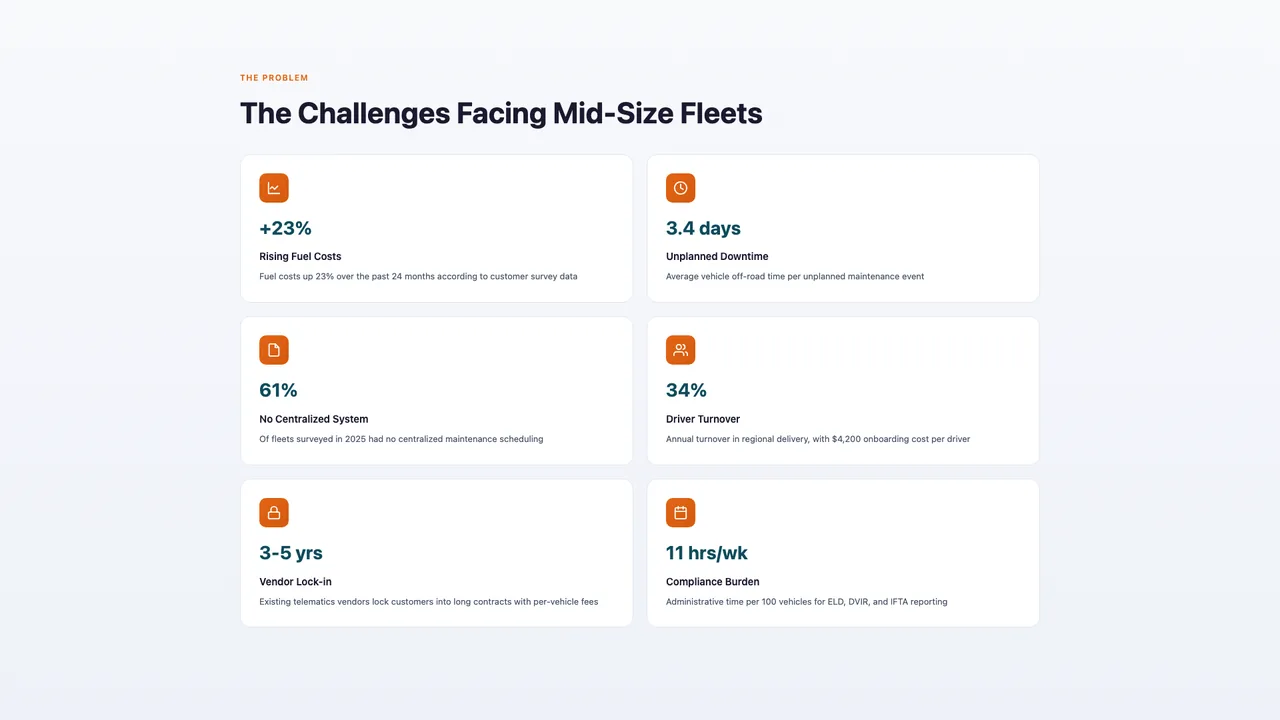
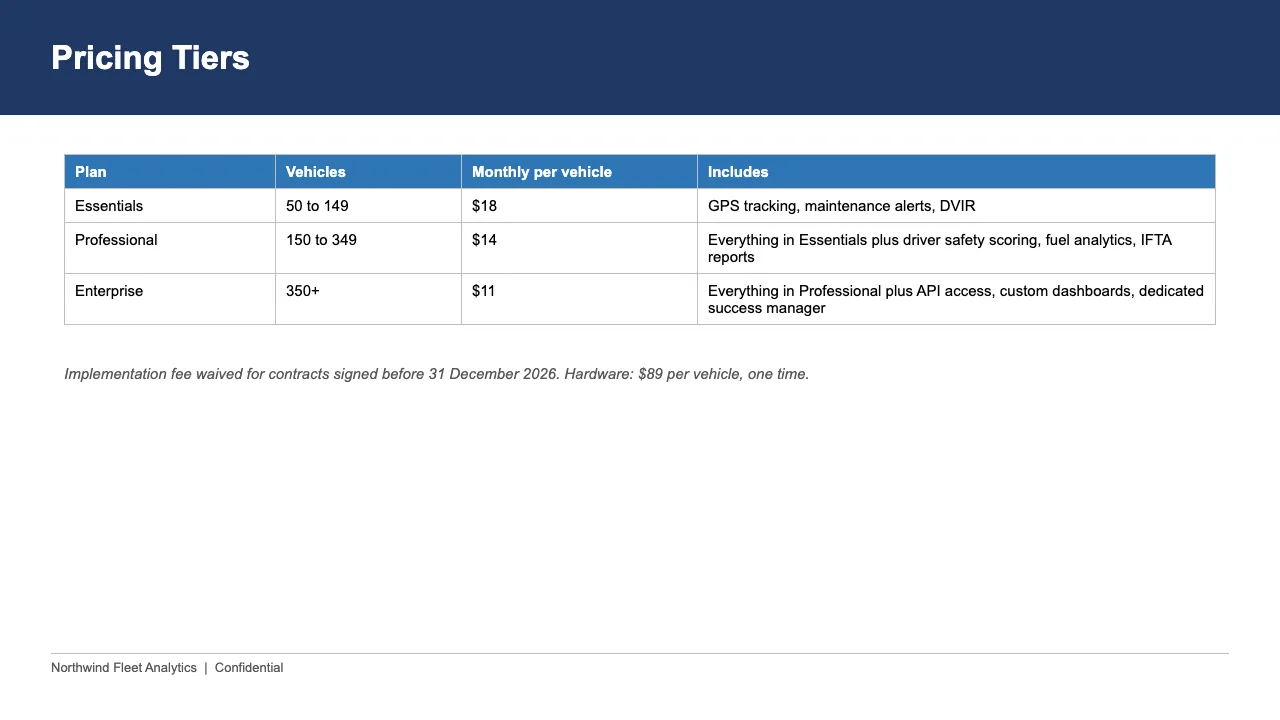
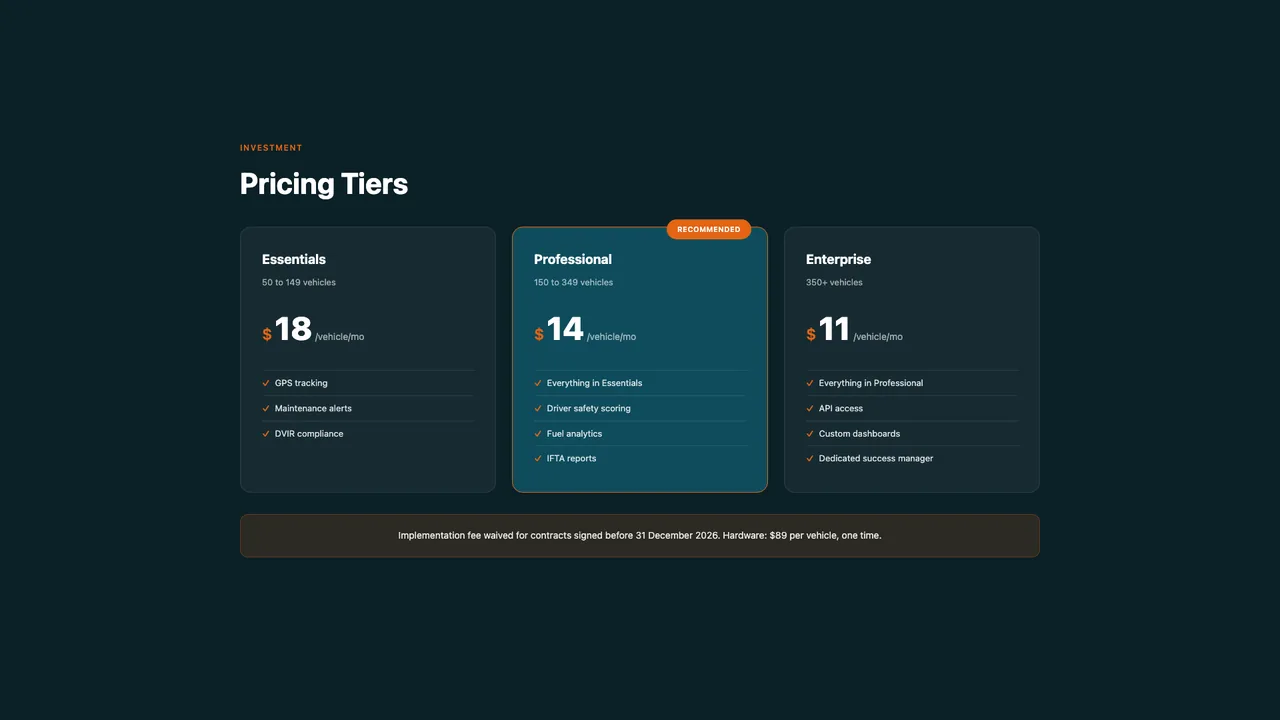
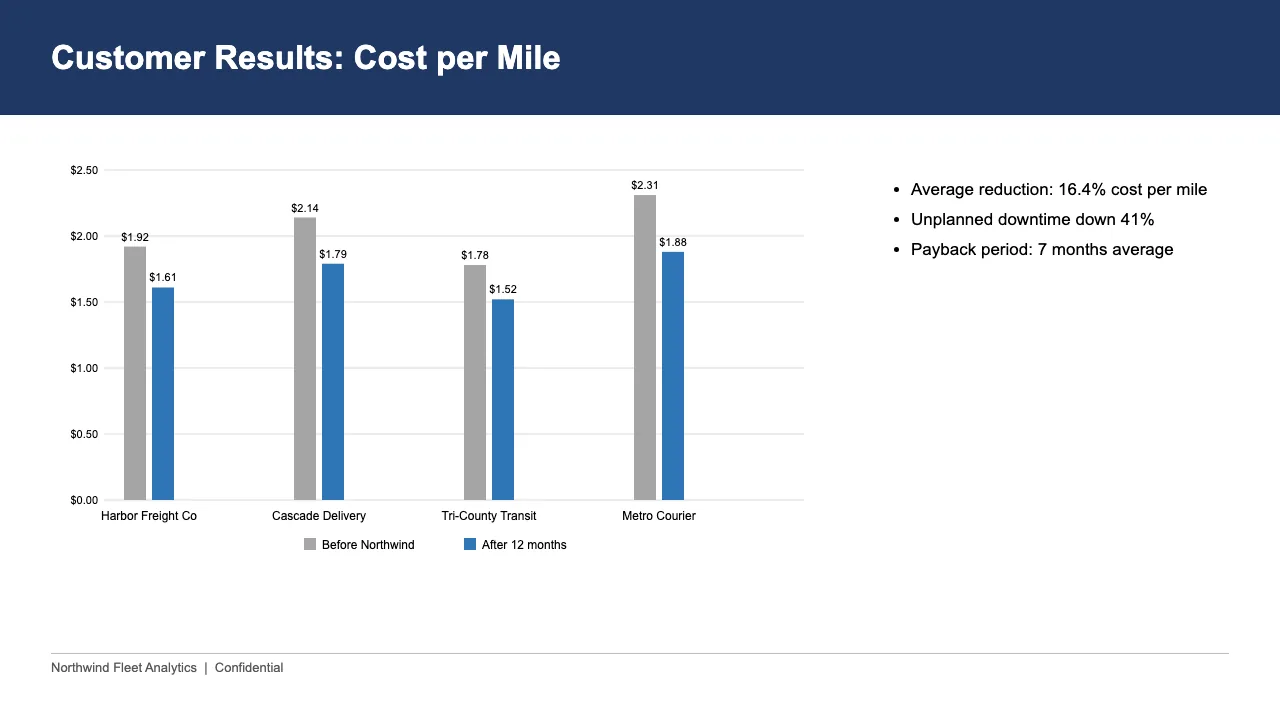
A six-slide sales deck for a fictional fleet-analytics company, built the way most decks are (Calibri, a navy bar, five long bullets), then uploaded and rebuilt one slide to one in the company's brand. Nothing was retyped.



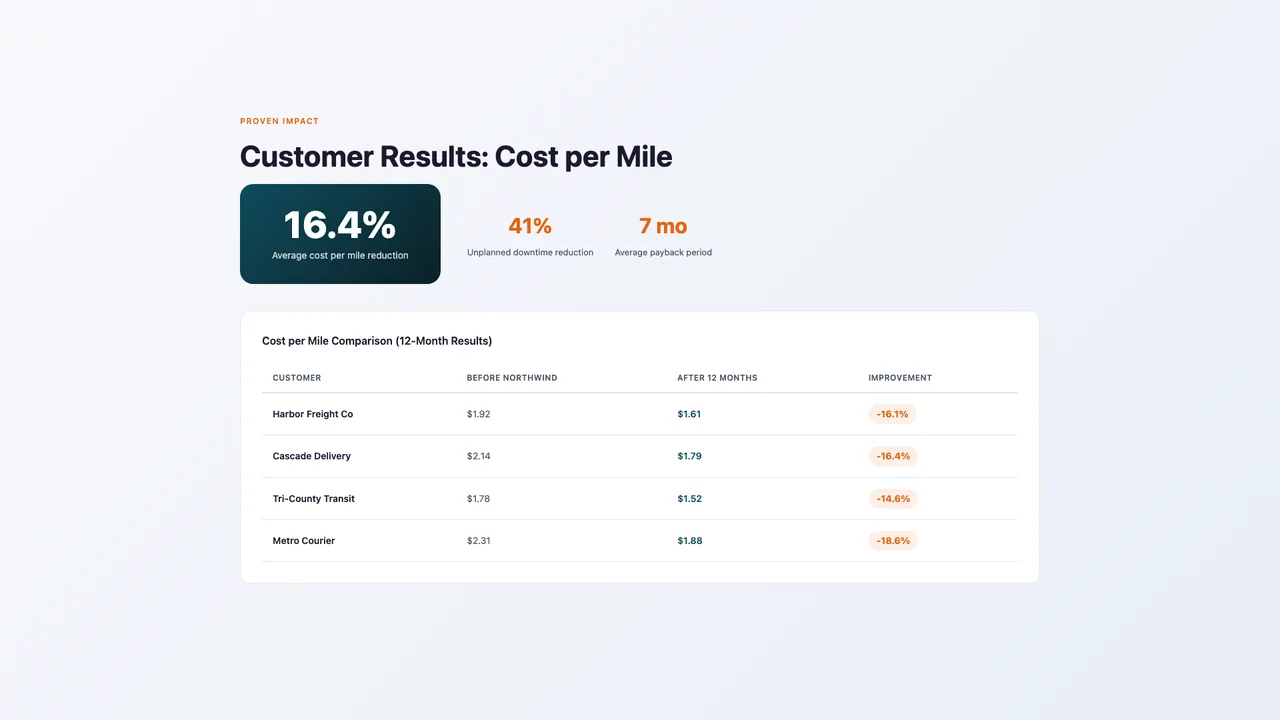
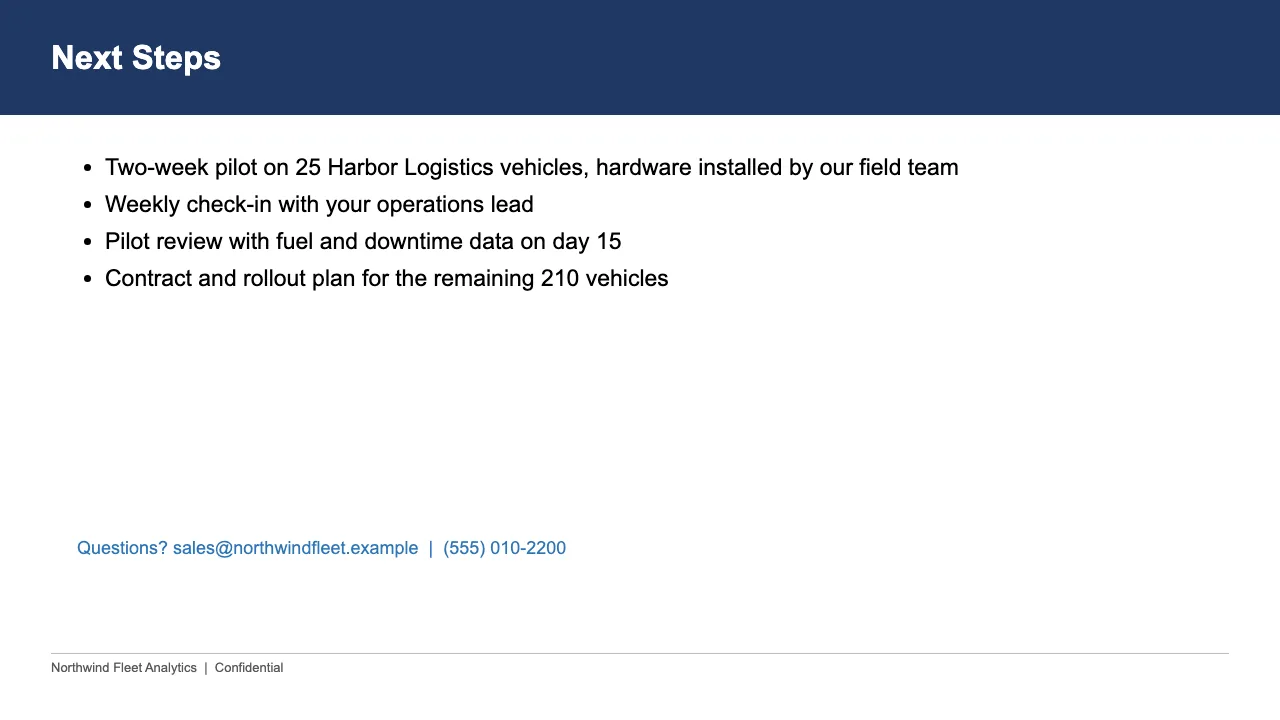
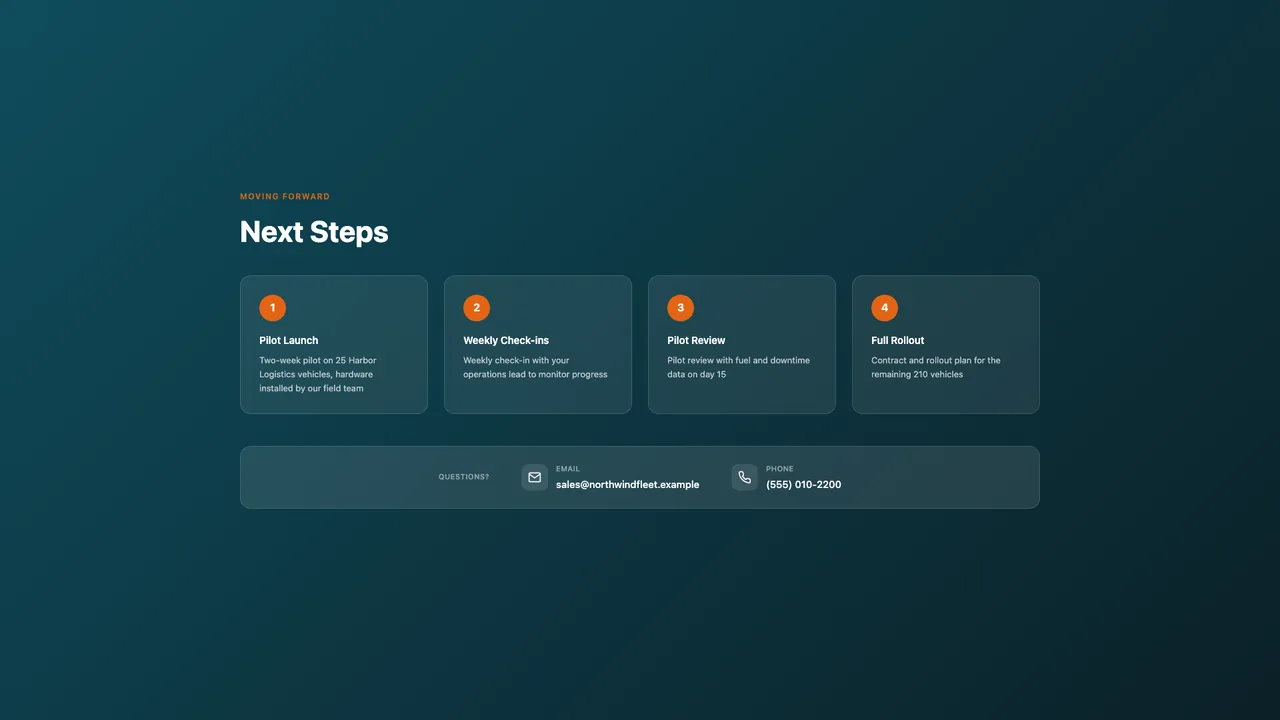
Want this on your own slides before signing up? The free preview rebuilds two of them.
Upload, point at your website, done
The whole thing takes a few minutes, and you review the captured brand before anything generates.
Upload the deck you have
Any .pptx up to 50 MB. PitchBoost reads every slide, titles, body copy, the lot, and keeps your narrative intact. Nothing gets summarized away without asking you first.
Point it at your website
One scan picks up your logo, brand colors, and tone of voice. That's what the redesign is built from, your brand, not a template gallery.
Get the redesigned deck as a shareable link
A few minutes later you have a professionally laid-out deck, published as a trackable link. Edit any slide, export to PDF or PowerPoint, and see who opens it.
The situation this page exists for
Title slide: from file name to first impression
Before: a default template title, a date, maybe a logo squashed in the corner. After: your brand's color and logo, a headline that says what the deck is for, and the presenter's name where it can be read from the back of the room.
The bullet wall: from eight lines to one point
Before: a title, eight bullets, 11-point type, the presenter reading it aloud. After: the slide's single claim as the title, the supporting points laid out in a structure that matches them (steps, a comparison, a grid), and the detail moved to speaker notes or a follow-up slide.
The chart slide: from screenshot to evidence
Before: a chart pasted at whatever size it came, the axis labels too small to read, the takeaway nowhere. After: the chart sized to fill the slide, the takeaway as the title, your data values carried over exactly, and colors matched to your brand.
What comes back
- Team and about-us slides: consistent headshot sizes, names readable, no clip-art org charts
- Agenda and section dividers: one visual system for the whole deck instead of five
- Closing slide: a real next step and contact details, not the word Questions
- The whole deck in one brand: same type, same palette, same spacing on every slide
Common questions
Can I see a before and after of my own deck before paying?
Yes. The free plan includes one AI deck a month, and a makeover counts as one. Upload the .pptx, point PitchBoost at your website for the brand, and compare the result to the original in a few minutes.
Does the makeover keep my content?
It keeps the content and rebuilds the design. Titles become the point of the slide, dense text is restructured, and nothing is invented: numbers, claims and chart values are carried over from your file.
What if I only want some slides made over?
Every slide in the rebuilt deck is editable, and you can regenerate or restore individual slides. Most people run the full makeover and then hand-tune the two or three slides they care most about.
Do I get an editable PowerPoint back?
Yes. Download an editable PowerPoint with real text boxes and fonts, an exact-look version that matches the web deck, or a PDF. The web link is also live, so you can share the after version straight away.
More ways teams use the redesign
PowerPoint redesign
Keep the content. Fix everything else. PitchBoost reads your .pptx, learns your brand from your website, and r…
Pitch deck makeover
Investors decide fast, and a homemade-looking deck reads as a homemade-looking company. Upload what you have; …
Make a PowerPoint look professional
There are two ways: spend a weekend learning design principles, or upload the deck and let PitchBoost apply th…
Upload & Redesign
The feature behind every page here: how the rebuild actually works.
Bulk Rebuild
Convert a whole folder of PowerPoints into your brand in one run.
- How to Fix a Slide With Too Much Text · 8 min read
- How to Fix a Broken Chart in PowerPoint · 8 min read
- How to Fix Inconsistent Fonts and Layouts in a PowerPoint · 9 min read
- Can ChatGPT Make a PowerPoint? What It Does Well, and How to Get a Designed Deck · 7 min read
- PDF to Editable PowerPoint: What Actually Works (And What Doesn't) · 8 min read
- Word Document to PowerPoint: How to Turn a Doc into a Real Deck · 8 min read
Or see it on your own slides first: the free redesign preview rebuilds two of them with no account.
Run the before and after on your own deck. The first one is free.
Upload the deck, point PitchBoost at your website, and see the redesign for yourself. One free deck a month, no credit card.
Upload Your Deck Free